Power Dialer
The power dialer works through a call queue for you, one call after another. Press start, and FreeCRM dials the first contact in the queue and opens the call’s page. When the call ends you record how it went, a short countdown runs, and the next contact is dialled. Your team can run the same dialer at the same time without ever calling the same person twice.
Every call is an ordinary FreeCRM call: it is recorded (unless the dialer is set not to), saved against the contact, and charged to your telephony balance like any other.
Who Can Use the Power Dialer
The power dialer is available on paid plans. It is not available during a trial.
There are two kinds of people involved:
- Power Dialer Managers set up dialers and choose who dials. This needs the Power Dialer Manager security group. It is not given to anyone by default: add it to the people who need it in Settings → Users, or to one of your roles. Super Users can always manage dialers.
- Agents are the people who make the calls. An agent needs:
- to be added to the dialer by its manager,
- permission to make calls,
- a phone number assigned to them. Numbers shared by everyone don’t count: the dialer always calls from the agent’s own number. Assign numbers in Settings → Telephony → Numbers.
A manager can only change the dialers they created, unless they are also a Call Admin.
Setting Up a Dialer
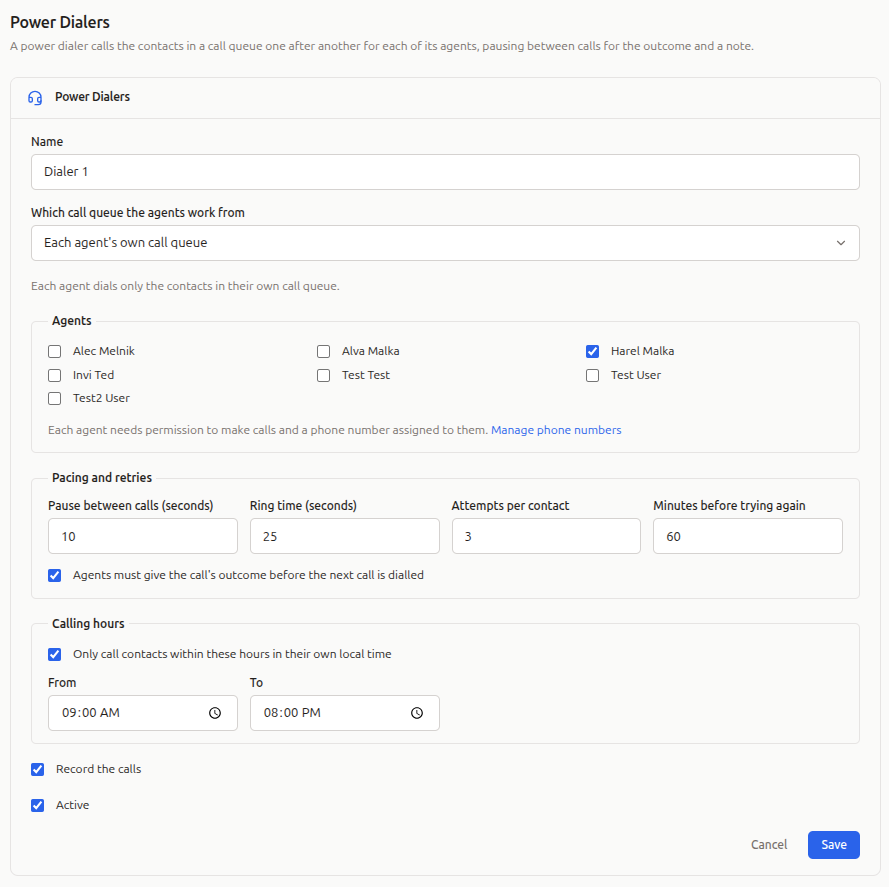
Go to Settings → Telephony → Power Dialers and click New power dialer.
Agents
Tick the people who will dial. Anyone who can’t dial yet (no permission to make calls, or no number assigned) is shown with the reason. Removing an agent stops their dialer straight away.
Which Call Queue the Agents Work From
Every dialer works from call queues. Choose one of:
| Option | What it means |
|---|---|
| The manager’s call queue | Every agent dials from the dialer manager’s own call queue. |
| All agents’ call queues, shared | The call queues of every agent and the manager are combined into one, and every agent dials from it. A contact queued by several people is called once. |
| Each agent’s own call queue | Each agent dials only the contacts in their own call queue. |
When agents share a queue, each call is assigned to the agent who made it.
Pacing and Retries
- Pause between calls (seconds): the countdown after a call before the next one is dialled. The default is 10 seconds.
- Ring time (seconds): how long a number rings before the dialer gives up on it.
- Attempts per contact: how many times a contact who doesn’t answer is tried before they leave the queue.
- Minutes before trying again: how long to wait before trying a contact who didn’t answer, was busy, or couldn’t be reached.
- Agents must give the call’s outcome before the next call is dialled: when ticked, the countdown doesn’t start until the agent has picked an outcome.
Calling Hours
By default the dialer only calls contacts between 09:00 and 20:00 in their own local time. FreeCRM uses the contact’s time zone if it is set, otherwise works it out from the phone number. If a number could be in several time zones (an area code that spans two, for example), it is only called when it is within the hours in all of them. Toll-free and other non-geographic numbers (800, 888 and so on) say nothing about where the person is, so they are called at any time, unless the contact has a time zone set.
Contacts outside the hours are not removed from the queue: they are held until the hours next open where they are, and the dialer moves on to someone it can call now. They show as scheduled in the dialer’s counts. When nobody can be called yet, the dialer says so, how many contacts are outside calling hours, and when the next call is due. It then waits and carries on by itself.
You can change the hours, or switch the check off. Calling people outside permitted hours may break telemarketing laws where your contacts live, so check the rules that apply to you before switching it off.
Recording and Switching a Dialer Off
Record the calls is on by default. Untick Active to switch a dialer off; anyone dialling with it is stopped.
Filling the Call Queue
The dialer calls the contacts in call queues; it doesn’t have a list of its own. To queue contacts:
- select contacts in any contact list and choose Queue calls to add them to your own queue, or
- choose Queue calls for user to add them to someone else’s queue. Call Admins can do this for anyone; a Power Dialer Manager can do it for the agents of the dialers they manage.
You can see your own queue under Calls → Call Queue.
Before every call the dialer checks the contact again. Contacts marked as do not call, deleted, or without a phone number are taken out of the queue rather than dialled.
Dialling
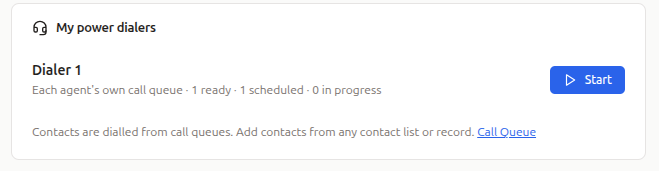
Go to Calls and click Power Dialer. You’ll see the dialers you are an agent of, and how many contacts are ready to call in each. Wait for your phone line to connect, then click Start.
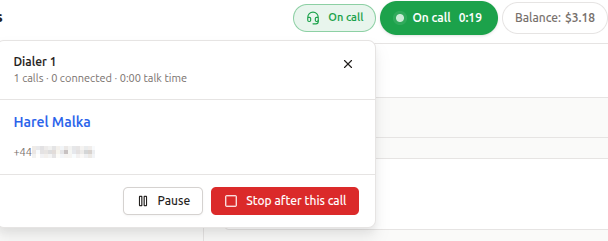
While the dialer runs, a bar in the header shows where you are, so you can move around FreeCRM between calls without stopping it:
- The dialer picks the next contact and dials them from your number. The call’s page opens, with the contact’s details.
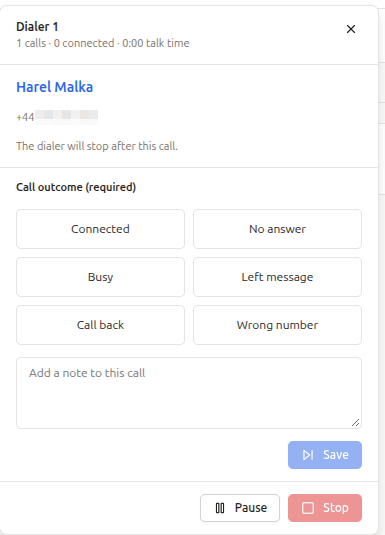
- When the call ends, choose the Call outcome, add a note if you like, and for Call back pick when.
- A countdown to the next call starts. Click Hold to stop the countdown while you finish your notes, or Next call to dial straight away.
From the bar you can also:
- Pause the dialer, and Resume when you’re ready,
- choose Stop after this call to finish the current call and then stop,
- Stop the dialer.
When the queue is empty the dialer waits and checks again every minute, so contacts added in the meantime are picked up.
You can only run one dialer at a time. If you open it in a second window or tab, you’ll be asked whether to Continue here, which stops it in the other window.
Call Outcomes
| Outcome | What happens to the contact |
|---|---|
| Connected | Leaves the queue. |
| Left message | Leaves the queue. |
| Wrong number | Leaves the queue. |
| No answer | Tried again later, until the dialer’s attempts per contact are used up. |
| Busy | Tried again later, until the dialer’s attempts per contact are used up. |
| Call back | Called again at the time you choose. Their attempts start again from zero. |
If you don’t pick an outcome, the dialer uses what the phone network reported (answered, no answer, busy). The outcome is also set as the call’s flag, if your calls have that option, and your note is saved on the call.
When the Dialer Stops on Its Own
The dialer stops and tells you why if:
- your telephony balance runs out,
- you are removed from the dialer, or it is switched off or deleted,
- you lose permission to make calls, or your number is no longer assigned to you,
- your window stops responding for a few minutes (for example, the laptop went to sleep). Any contact it was holding goes back into the queue. A call still in progress is never cut off.
Watching Your Team
Power Dialer Managers see a Live monitor on the Power Dialer page for each dialer they manage. It shows every agent, whether they are dialling, paused or not dialling, the call they’re on, and their calls, connected calls and talk time today, together with how many contacts are ready, scheduled for later, or being called.
