FreeCRM
Documentation
- Welcome
- Data Templates
- Multi Templates
- Filters and Views
- Quick Search
- The Bin
- Board View
- Importing Data
- Users and Roles
- Telephony
- UK Number Registration
- Scheduling and Booking Pages
- Video Conferencing
- Email Accounts
- Automation
- Campaigns
- Email Template Library
- Invoices
- Forms
- Embedding Forms
- Landing Pages
- DocuSign
- AI
- Custom UI
- API
UK Number Registration
New UK phone numbers can only be bought once you have proved who you are: each UK local, mobile and toll-free number has to be covered by an approved regulatory registration.
FreeCRM lets you register from inside the app. You fill in your details once, they are reviewed, and once approved you can buy UK numbers as usual.
UK numbers you already own keep working as before. You do not need to register for them.
Number registration is available on paid plans to users with the Telephony Manager role.
When you need to register
You will be asked to register when you try to buy a UK number and have no approved registration for that type of number.

You can also start a registration at any time from Settings > Telephony > Number Registration.
Who registers
The registration is for the person or business that actually uses the numbers: you. FreeCRM does not register on your behalf.
Choose Business if the numbers are used by a company or organisation. You will be asked for:
- the business name, website and registration number (for UK companies, the Companies House number),
- the name, mobile number and work email of an authorised representative,
- the business address. For local numbers this has to be a UK address; for mobile and toll-free numbers it can be anywhere. A PO Box is not accepted.
No documents are needed for a business.
Choose Individual if you use the numbers in your own name. You will be asked for your name, email, mobile number and address, and to upload:
- proof of identity: a passport or other government-issued ID, showing exactly the name you entered,
- proof of address, for local numbers only: a utility bill, tax document, rental agreement or similar, issued within the last year and showing a UK address.
The mobile number you give has to be a real mobile where you can be reached. It cannot be a number bought from a telephony provider, including a FreeCRM number.
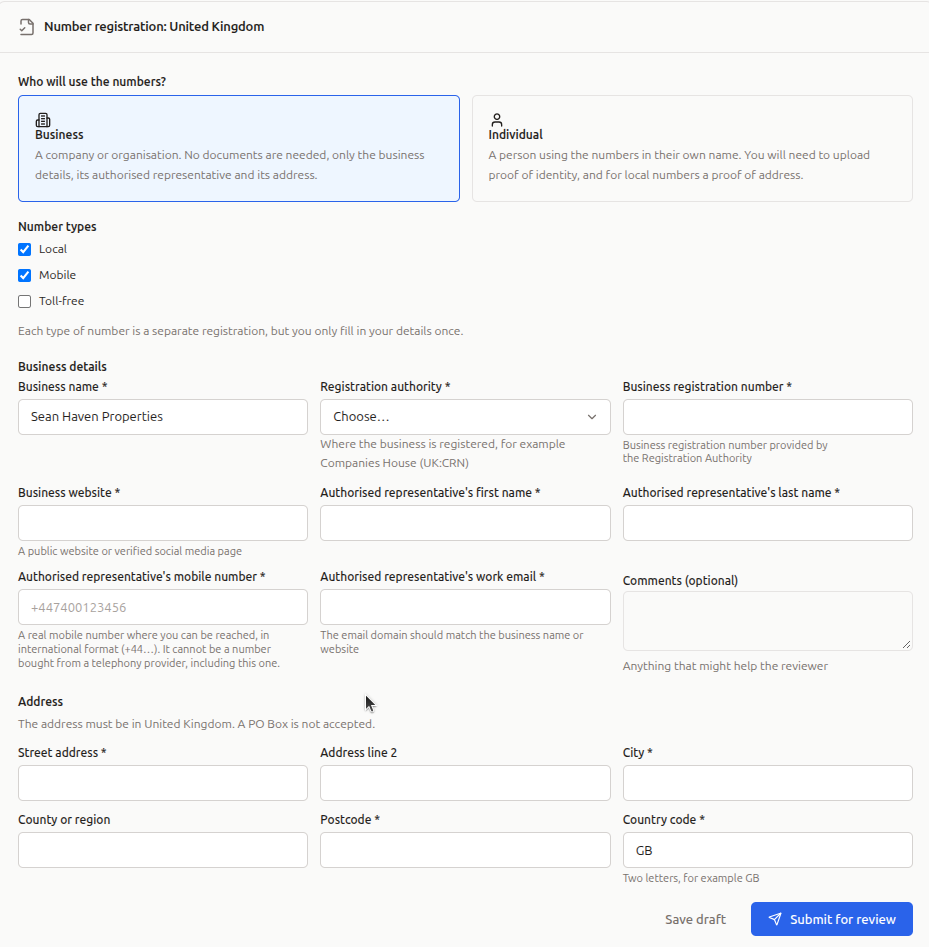
Number types
Local, mobile and toll-free numbers are registered separately, but you only fill in your details once: tick every type you want and FreeCRM submits one registration for each.
Your documents
Documents are sent straight to our telecoms provider for verification. FreeCRM does not keep a copy. If a document is rejected, you will need to upload it again.
Submitting and review
Click Save draft to come back later, or Submit for review when you are ready. FreeCRM checks your details first and points out anything missing or invalid before anything is sent.
Each registration is then reviewed by hand, which usually takes from a few hours to a few days. FreeCRM checks on it regularly and sends you a notification in the app as soon as it is approved or rejected. You can also click Refresh on the Number Registration page to check right away.

If a registration is rejected, the reviewers’ feedback is shown next to it. Correct your details and submit it again.
After approval
Once a registration is approved:
- you can buy numbers of that type. If you were in the middle of buying a number, the notification takes you back to it, and it is offered first if it is still available,
- any UK numbers of that type you already own are added to the registration too. If one cannot be added, it is listed with the reason and a Retry adding numbers button. Those numbers carry on working either way.
Expiry and renewal
Some registrations are approved until a set date. FreeCRM notifies you 30 days and again 7 days before it expires. Once it has expired you cannot buy more numbers of that type until you renew it. Click Renew on the Number Registration page: your details on file are reused, so there is nothing to fill in again unless something has changed.