FreeCRM
Documentation
- Welcome
- Data Templates
- Multi Templates
- Filters and Views
- Quick Search
- The Bin
- Board View
- Importing Data
- Users and Roles
- Telephony
- UK Number Registration
- Scheduling and Booking Pages
- Video Conferencing
- Email Accounts
- Automation
- Campaigns
- Email Template Library
- Invoices
- Forms
- Embedding Forms
- Landing Pages
- DocuSign
- AI
- Custom UI
- API
Quick Search
The search box at the top of every page finds records across FreeCRM. Type a name and press Enter: contacts are matched on their name, the company they work for and their address, and other records on their name. Typing a full email address also finds the contact it belongs to.
Search modifiers
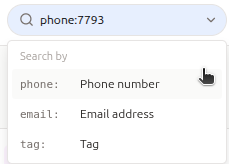
Start your search with a modifier to search something other than names. Click the small arrow at the end of the search box to pick one, or type it yourself.
| Modifier | Finds | Example |
|---|---|---|
phone: |
Contacts and companies with a phone number containing the digits you type. Type the number however you like: spaces, brackets, a leading 0 or the country code don’t matter. Enter at least 3 digits. | phone:07793 147192, phone:147192 |
email: |
Contacts and companies with an email address containing what you type. Any part of the address works. | email:acme.com, email:john@ |
tag: |
Records with that tag. | tag:VIP |
To see the records an import created, use the link next to that import on the import log.
You only see records you have permission to open.