FreeCRM
Documentation
- Welcome
- Data Templates
- Multi Templates
- Filters and Views
- Quick Search
- The Bin
- Board View
- Importing Data
- Users and Roles
- Telephony
- UK Number Registration
- Scheduling and Booking Pages
- Video Conferencing
- Email Accounts
- Automation
- Campaigns
- Email Template Library
- Invoices
- Forms
- Embedding Forms
- Landing Pages
- DocuSign
- AI
- Custom UI
- API
Users and Roles
Every user in FreeCRM has a set of permissions: what records they can create, change or delete, whether they can run campaigns, manage telephony, import data and so on. Permissions come in ready-made bundles called security groups, such as Contact Manager, Deal Manager or Record Remover.
Roles let you describe a job once and give it to many people. A role is your own named bundle of security groups and permissions, such as Sales Rep, Accounts or Read only. Everyone holding a role gets what it gives. Change the role, and everyone holding it changes with it.
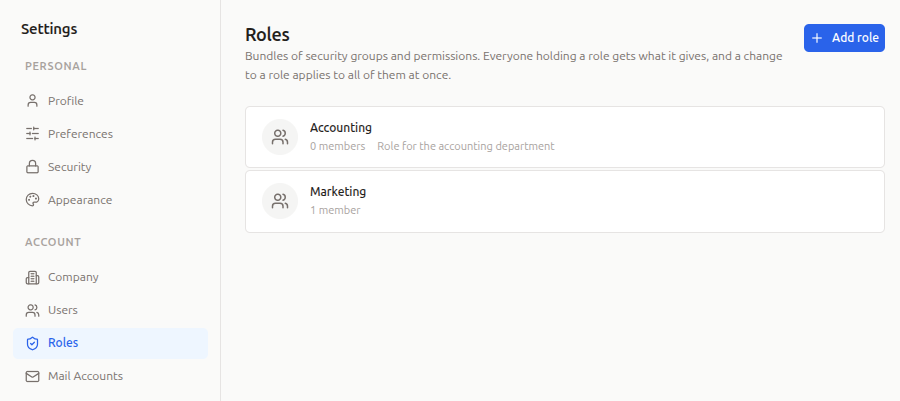
Roles are a PRO feature. If your account moves to a free plan, existing roles keep working: nobody loses access, but roles can no longer be created or changed.
How Permissions Add Up
A person’s permissions come from three places, and they all add up:
- Their roles: everything each of their roles gives.
- Their own security groups: groups given to them directly.
- Their own permissions: single permissions given to them directly.
Nothing takes away. A role can only add to what someone may do, and a person can hold several roles at once. Someone who works in both sales and billing simply holds both roles.
For example, Dana holds the Sales Rep role, which gives Contact Manager and Deal Manager. She has also been given Import Manager directly. Dana can work with contacts and deals, and import data. If Dana leaves the Sales Rep role, she keeps Import Manager.
One thing to be aware of: anything given to a person directly stays when they leave a role. If Dana had Contact Manager both directly and through Sales Rep, she would keep it after leaving the role. The user editor shows where each permission comes from, so this is easy to spot.
Creating a Role
You need the User Manager security group to create, change and delete roles.
- Go to Settings → Roles and click Add role.
- Give the role a name and, if you like, a description.
- Pick a starting point, or tick the groups yourself:
- Standard user: the groups every new user gets by default.
- Administrator: the standard groups plus user management, configuration, billing and the other administrative groups.
- Read only: can view records but not change them.
- Under Permissions, add any single permissions the groups don’t already cover.
- Under Members, tick the people who should hold the role.
- Click Save.
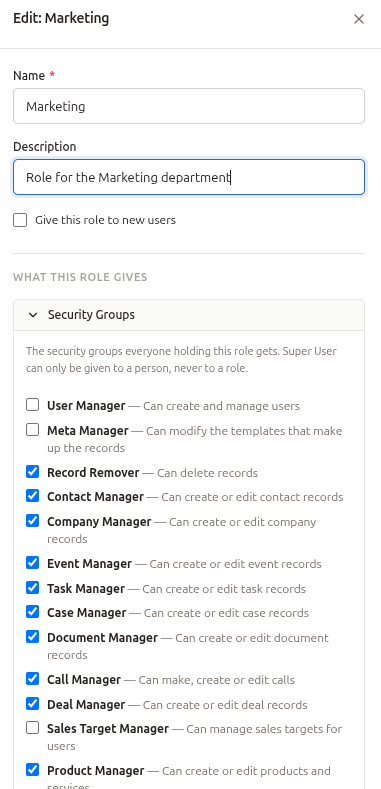
You can also start a role from someone you have already set up: open them in Settings → Users and click Create a role from this user. The new role starts with that person’s own groups and permissions.
Giving People Roles
You can add people to a role from the role itself (Members), or from the person: open them in Settings → Users and tick their roles under Roles.
The user editor shows each person’s full picture:
- Roles: the roles they hold.
- Security Groups: the groups given to them directly. A group that only comes from one of their roles is shown with granted by and the role’s name.
- Permissions: anything already covered by a group or a role is ticked and greyed out, with where it comes from.
Roles for New Users
Tick Give this role to new users on a role, and anyone you add from now on starts with it, instead of the standard set of groups. You can still change what a new person gets before you save them.
Super User
The Super User group cannot be part of a role. A Super User can close the account, transfer ownership and make other Super Users, so it is always given to a named person, directly. A role that holds every other group is a full administrator without those three powers.
Sharing Private Records with a Role
A private record can be shared with people and with roles. Everyone holding the role can see the record, and someone who joins the role later sees it straight away.
In a record’s access field, the picker lists Roles first, then People. Type to search both. Role chips show a group icon; hover over one to see how many people hold it.
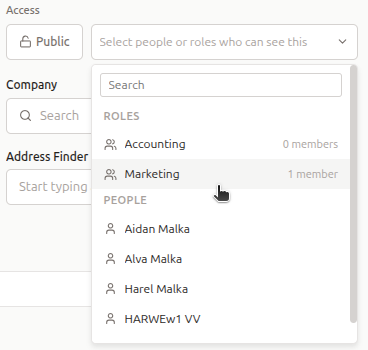
The same picker is used when you set access on many records at once from a grid selection, and in filters, so you can build a view such as private records shared with Sales Rep.
If a role is deleted, the records shared with it are simply no longer shared with it. The people named on them directly keep their access.
Deleting a Role
Delete a role from Settings → Roles. Everyone holding it loses what it gave them, and anything they were given directly stays. Roles can be deleted on any plan.