FreeCRM
Documentation
Automation in FreeCRM
Automation lets FreeCRM do routine work for you. An automation is a rule with three parts: when something happens to a record, if the record looks a certain way, do one or more things to it.
For example: when a contact’s status changes to Inactive, tag it “lapsed”, add it to a win-back campaign, and create a task for the account owner to call them. Nobody has to remember, and it happens the moment the change is saved.
Finding automations
Open the Settings screen:
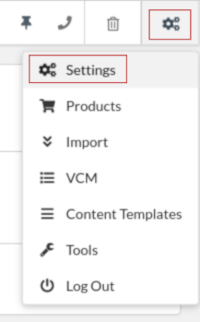
and select the Automation tab. You will see the automations already set up on your account, each showing what triggers it and whether it is active:
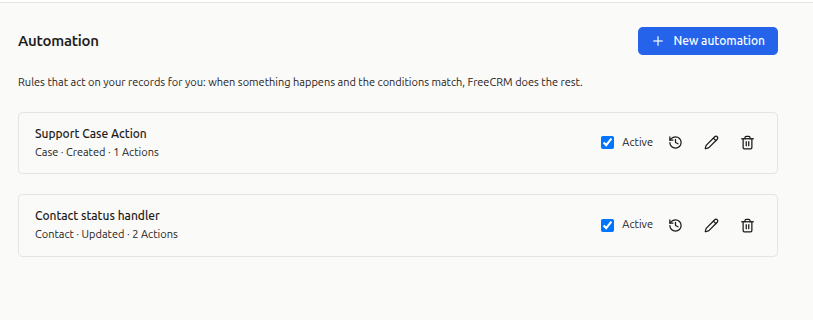
Click New automation to create one, or any existing row to edit it.
Building an automation
1. Name it
Give the automation a name that says what it does — you will be reading this list again in six months. The description is optional and is only ever shown here.
2. Choose the record type and trigger
Automations run on Contacts, Companies, Deals, Cases and Tasks. Pick the record type first, since it decides which fields and actions are available.
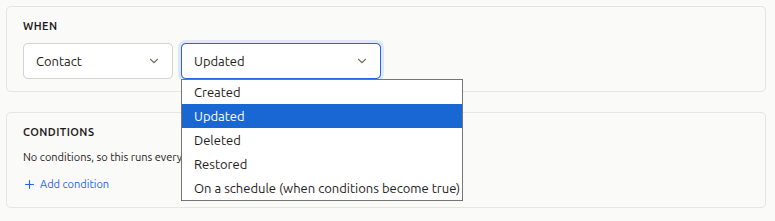
Then choose the trigger — what makes the rule run:
- Created: a new record of that type was added.
- Updated: an existing record was saved with changes.
- Deleted: a record was moved to the bin.
- Restored: a record was brought back out of the bin.
- On a schedule (when conditions become true): nobody touched the record — it simply came to match your conditions as time passed. See Time-based automations below.
3. Add conditions
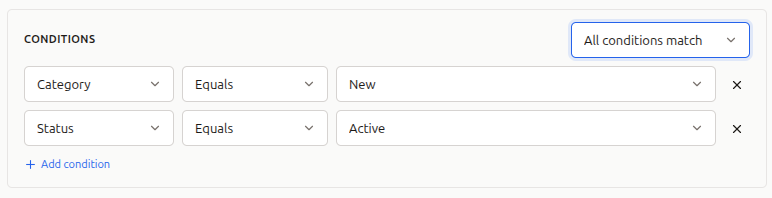
Conditions decide which records the rule acts on. Each condition is a field, an operator and a value — the same shape as a filter.
You can require that all conditions match or that any condition matches, and you can nest groups inside one another to build something like “status is New and (rating is 4 or more or source is Referral)”.
Most operators compare the record as it is now: equals, does not equal, contains, does not contain, greater than, less than, is set, is empty.
Three operators are different — they look at what the save changed rather than at the record’s current state:
- Has changed: the field was altered, whatever it was altered to.
- Changed to: the field now holds this value, and did not before.
- Changed from: the field used to hold this value.
These are the ones that let you say “when status becomes Inactive” rather than “whenever an inactive contact is saved for any reason” — a distinction that matters, because without it the rule fires again every time anyone edits that record.
Leaving the conditions empty means the automation runs every time the trigger fires, on every record. That is occasionally what you want, but check it is.
4. Add actions
Actions are what the automation does, and they run in the order you list them:
- Update a field: set a field on the record that triggered the rule.
- Create a record: make a new Task, Case, Deal and so on. Unless you turn linking off, the new record is automatically linked back to the one that triggered the rule — so a task created from a contact is already attached to that contact.
- Add to a campaign / Remove from a campaign: contacts only.
- Add a note: append a note to the triggering record.
- Add tags: add one or more tags. Tags the record already has are left alone.
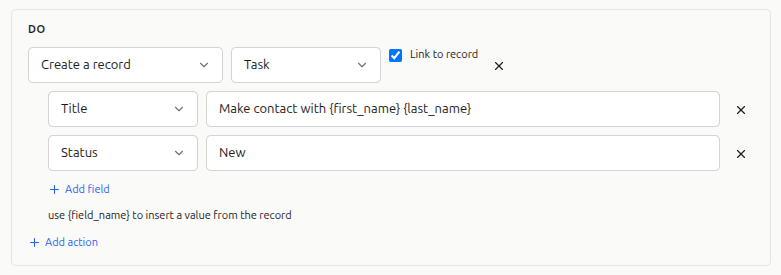
If one action fails, the rest still run. The run is recorded as partly successful, and the log tells you which action failed and why.
5. Save and activate
An automation is active as soon as you save it. Untick Active to pause one without deleting it — useful while you are still deciding whether a rule does what you meant.
Using record values in actions
Anywhere an action takes text, you can drop in values from the triggering record by putting the field name in curly braces:
Call {first_name} {last_name} about their {status} enquiry
You can also write {contact.first_name}, which reads the same. A field that is empty
simply disappears from the text.
Date fields in actions can be set relative to now rather than to a fixed date — “3 days from now”, “1 week from now” — which is how a follow-up task gets a due date that makes sense whenever it is created. Use a negative number for a date in the past.
Limiting to one user
By default an automation runs whoever caused the change. Only when triggered by limits it to changes made by one specific person — for instance, a rule that only applies to records a particular salesperson edits.
This does not apply to scheduled automations, which nobody triggers.
Time-based automations
Most automations react to something a person did. Some of the most useful ones react to nothing happening at all: a lead that has sat untouched for ten days, a deal that has been in negotiation for a month.
There is no save to react to there, so these rules work differently. Choose the trigger On a schedule (when conditions become true) and write conditions describing the state you care about — typically using the Record age field, which every record has and which counts the days since the record was created (see Data Templates).
A worked example — chase up leads that have gone quiet:
- Record type: Contact
- Trigger: On a schedule
- Conditions: Record age · is at least · 10 and Status · equals · New
- Action: Create a record → Task, titled
Follow up with {first_name} {last_name}, due 1 day from now
FreeCRM checks these rules every hour and acts on each record once — the first time it matches. That is what stops the rule above creating the same follow-up task every hour for as long as the contact stays New.
Three things to keep in mind:
- Prefer “is at least” over “equals”. A rule written as record age equals 10 only matches during that single day. Is at least 10 catches the record whenever the sweep next runs.
- A scheduled automation must have at least one condition. Without one it would describe every record in your account, and act on all of them. FreeCRM will not save a scheduled rule with no conditions.
- The “changed” operators are not available on scheduled rules. There is no save to compare against, so nothing can have changed.
If you switch a scheduled automation off and on again, records it has already acted on stay acted on — it will not go back over them.
Checking what ran
Each automation keeps a log of its runs. Open the automation and look at the run log to see which records it acted on, when, and whether every action succeeded:
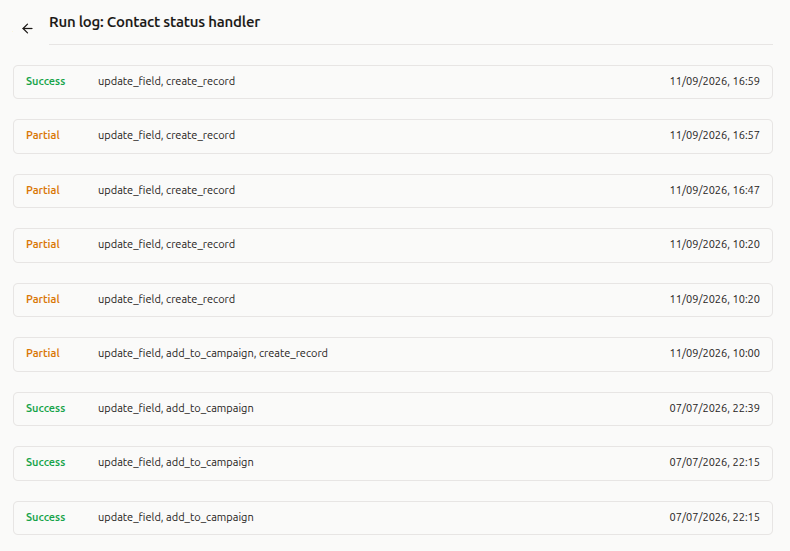
A run is recorded as Success when every action worked, Partial when some did, and Fail when none did. Partial and failed runs include the reason, which is usually enough to see what needs correcting.
Things worth knowing
Automations do not set each other off. When an automation updates a record, that save does not trigger further automations — including the rule that made the change. Without this, a rule that updates a field on update would run forever.
Order matters within a rule, not between rules. Actions inside one automation run top to bottom. If several automations match the same event, they each run, but you should not depend on the order they run in.
Calculated fields cannot be set. Fields FreeCRM works out for you — record age, last call, last event — have no stored value, so “Update a field” will not accept them as a target.
Deleting an automation deletes its history. The run log goes with it. If you only want to stop it, untick Active instead.