FreeCRM
Documentation
Video conferencing
FreeCRM can create a video meeting link automatically whenever someone books time with you. The link is created against your own account with the provider, sent to the invitee with their confirmation and calendar invitation, and shown on the meeting in your CRM calendar.
Four providers are supported:
- Google Meet
- Microsoft Teams
- Zoom
- Zoho Meeting
To manage your connections, open Settings and select Video conferencing.
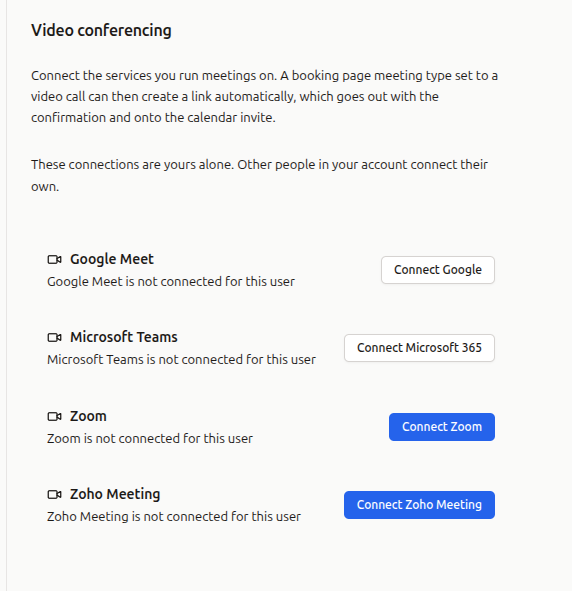
Connections are personal
Each person connects their own accounts. This is deliberate: a Zoom meeting has to be hosted by somebody, and a booking should open a room that belongs to the person the invitee is actually meeting.
If everyone in your account should use one shared identity, connect the same credentials on each user.
Connecting a provider
How you connect depends on the provider.
Google Meet and Microsoft Teams
These use the Google and Microsoft connections you may already have. There is no separate sign-in for them: if you have connected Google under Settings -> Google, or Microsoft under Settings -> Microsoft 365, Google Meet or Teams will show as connected here.
The Video conferencing screen links straight to those settings when a connection is missing.
Zoom and Zoho Meeting
These have their own connection. Click Connect Zoom or Connect Zoho Meeting, sign in, and approve the permissions. A window opens for the provider and closes again once you are done.
To disconnect later, use Disconnect on the same screen. Meetings that have already been created keep working; FreeCRM simply stops being able to create new ones.
Choosing a provider for a meeting type
Links are created for bookings, so the provider is chosen per meeting type.
- Open Settings -> Scheduling -> Booking pages.
- Open a booking page and edit one of its meeting types.
- Set the location to Video call.
- Choose a video provider.
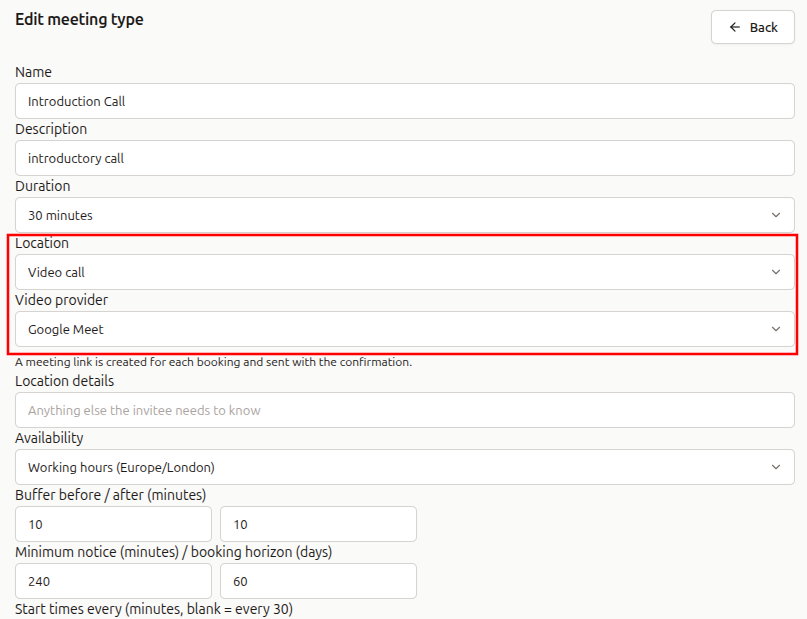
Only providers you have actually connected are offered. Choosing No automatic link keeps the old behaviour: whatever you type into location details is sent to the invitee instead, which is useful if you have a permanent meeting room link you always use.
Different meeting types can use different providers. An intro call can be a Zoom meeting while a support call is on Teams.
Where the calendar comes in
Google Meet and Microsoft Teams create the link on the calendar event itself. That means the booking has to land on a calendar from the matching provider — a Google calendar for Meet, a Microsoft calendar for Teams.
The calendar that receives bookings is set on the booking page, under Calendar. Left as My primary calendar, bookings go to whichever calendar is your primary one.
If your booking calendar does not match, you have two options:
- pick a calendar from that provider on the booking page; or
- use Allow without a calendar on the Video conferencing screen, which asks the provider for the extra permission needed to create a meeting on its own.
FreeCRM tells you which of these is missing when you choose the provider, rather than letting you find out from a booking with no link in it.
Zoom and Zoho Meeting have no such requirement. Their meetings are independent of any calendar, so they work whether or not you have one connected.
What the invitee gets
When someone books a meeting type with a video provider set, the join link appears:
- on the confirmation page, immediately after booking;
- in their confirmation email;
- in the calendar invitation attached to that email, so the link is on the event in their own calendar;
- on the booking management page they can return to later.
Where the provider supplies a passcode or dial-in number, those are included as well.
Rescheduling and cancelling
Rescheduling moves the meeting to the new time. With Zoom and Zoho Meeting the join link is unchanged, so a link the invitee has already saved keeps working. With Google Meet and Teams the calendar event is recreated, so a new link is issued — the reschedule email and the updated calendar invitation both carry it.
Cancelling cancels the meeting with the provider and removes the link from the booking.
Seeing the link in the CRM
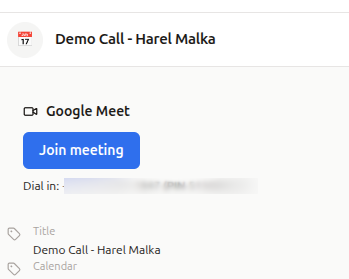
Booked meetings appear in your CRM calendar like any other event. Open one and the video meeting is shown alongside the event details, with a Join meeting button and any passcode or dial-in numbers the provider supplied.
If a link is not created
A booking is never lost because a video provider was unavailable. If the link cannot be created, the booking is still confirmed and the invitee still receives their confirmation — it simply has no link in it.
When that happens:
- the event in your calendar shows why the link failed;
- you receive a notification in the app and an email, so you can add a link manually or fix the connection.
The most common causes are:
- The connection has expired. The Video conferencing screen shows a connection that needs reconnecting. This happens if you change your password with the provider, or revoke access from their side.
- The booking calendar does not match the provider. See “Where the calendar comes in” above.
- A personal Microsoft account. Teams meetings need a work or school account. Personal outlook.com accounts cannot create them.
Practical tips
- Connect the provider before setting it on a meeting type. Only connected providers are offered.
- If you already have a permanent meeting room you prefer, leave the provider as No automatic link and put that link in location details.
- Check which calendar a booking page uses before choosing Google Meet or Teams. It is the most common reason a provider is not offered.
- Nothing needs to be connected for phone or in-person meeting types. The video provider only applies when the location is a video call.